Welcome to the Client Room.

Client updates shouldn’t be another thing on your to-do list.

Open jobs. Candidate status. Placements. All live, all in one place and updated the moment something changes. Your clients don’t have to ask for updates. They already have them.

Signal
Reason
Priority
Action
Outcome
CLIENT SIGNAL / 014 Observing
Resolved priorityDecision velocity

Move the stalled submission

Hiring-manager preference conflicts with the current review order.

01
Open demand4 active orders
live
02
Decision queue2 reviews waiting
attention
03
PreferenceShift experience weighted
learned
Request focused feedback
→Review moving↗

Every candidate, every stage, already on screen.

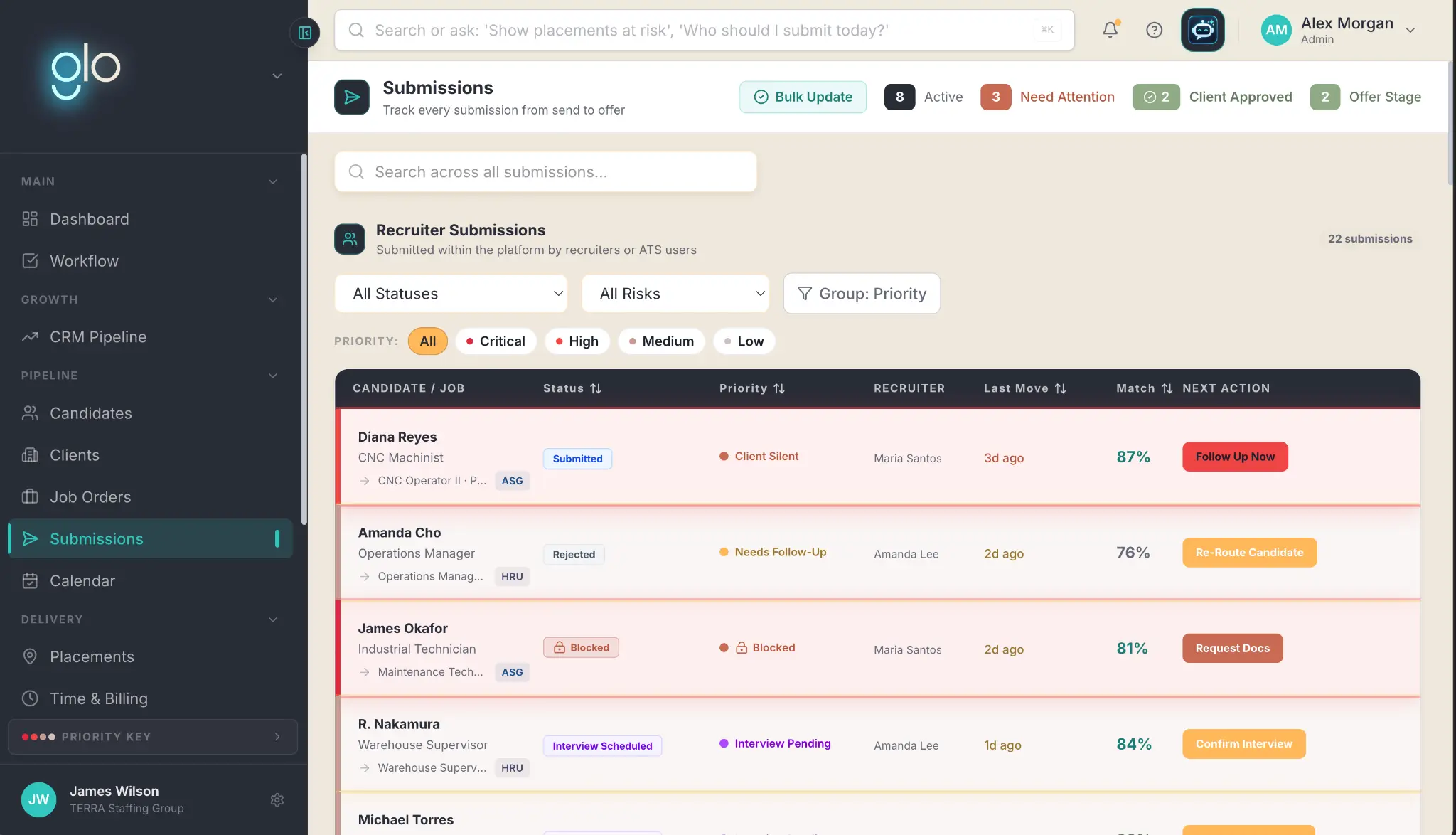
Clients get a clear view of every candidate at every stage of the pipeline: who’s in, who’s moving, and what happens next. When a candidate moves, the Client Room moves with them, so clients always see the latest status without waiting for an update.

The answer to ‘where do we stand?’ is already there.

Glo submissions view showing candidate stage, priority, recruiter, match, and next action
01

Approve, request changes, or give feedback, right where the candidate lives.

Clients can review a submission and leave feedback without bouncing between tools. Every comment, question, and decision lives with the candidate it’s about. Say goodbye to digging through emails, chasing down notes, or trying to remember who said what.

Everything stays together. The process keeps moving.

02

Client feedback goes straight to work.

12%more likely to make a quality hire with the most skills-based searches

Glo learns what the client wants, what they pass on, and what they want to see more of, then puts that information to work on what comes next.

Every rating and preference feeds directly back into candidate matching. The more a client tells Glo what works, the sharper the matching gets, and the stronger the next submission becomes.

Source: LinkedIn, The Future of Recruiting 2025 ↗Explore candidate matching ↗
03

One job. One conversation. Everyone on the same page.

Messages between clients and recruiters live inside the Client Room, tied directly to the job order they’re actually about. Questions, answers, feedback, and follow-ups all happen in the same thread, with the full conversation right there for everyone who needs it.

Your inbox, conversations, and collaborators? All connected, clear, and easy to follow.

Explore The Desk ↗

Contracts and alerts, always in view.

Renewal dates, terms, and status updates all in one place. Everything lives inside the Room, so nothing gets buried inside an inbox or lost in a separate system. Clients have a current view of what’s active, what’s changing, and what needs their attention next.

Explore connected systems ↗

Scheduling done right.

45%of sales and marketing professionals cite back-and-forth scheduling as a major challenge

In the Room, clients see availability and confirm next steps in one place that both sides can trust. Everything stays current and easy to find, so there’s less back-and-forth and fewer missed updates.

Both sides work from the same schedule, so the process stays on track.

Source: Zoho Bookings appointment scheduling survey ↗

A clearer read on workforce and compensation trends, when it’s useful.

65%of organizations are confident in their market-pricing strategy

Workforce trends, compensation benchmarks, and what’s happening in the market, all inside the Room. It’s a bonus layer of insight on top of the visibility they’re already there for.

When questions around pay, talent availability, and market conditions pop up, Glo has the answers ready to go.

Source: Payscale, Compensation Best Practices Report ↗
Workforce signalCompensation range shifting

Current market context appears beside the live client relationship, where the team can use it.

Give your clients a reason to open the Room instead of the phone.

Bring one active client relationship. We’ll show you what they’d see the moment they logged in.

Book a demo ↗